
Location Mate - Share & Track
IMPACTSOLTERMaps & Navigation
3.6209.00 Reviews
- Version
- 1.0.52
- Installs
- 1.00M
- Age Rating
- Everyone
Screenshots
Our Review of Location Mate - Share & Track
 Analysis by Appyee
Hey there! So, I recently got my hands on an app called Location Mate - Share & Track, and let me tell you, it's quite the nifty little tool for anyone who’s constantly on the go. Whether you’re coordinating with friends, keeping tabs on the family, or just trying to make sure you’re not lost in a new city, this app has got you covered. Let me walk you through my experience with it.
The first-week appeal
My first impression was that this kind of tool is easiest to appreciate when a group has a specific reason to use it. On a family day out, for example, sharing a location can save repeated messages about who has reached the meeting point. On a city visit with friends, it can make finding one another simpler than describing a corner or storefront over text. Those are useful, immediate wins, but I would not keep location sharing switched on for everyone just because the feature is available. It works best when the people involved agree on when sharing is useful and when it should stop.
Location Mate is a free app in the maps and navigation category, developed by IMPACTSOLTER. It has an average rating of 4.2 from around 2,600 ratings, and has been installed over a million times. It is rated for everyone, with a current version of 1.0.30 and a minimum operating-system requirement of version 7.0. Those details make it approachable for a broad audience, though the practical value still depends on whether your friends or family are willing to use the same location-sharing routine.
Getting Started with Location Mate
First things first, downloading Location Mate - Share & Track was a breeze. It’s available on both Android and iOS, which is super convenient. Once you’ve got it installed, setting it up is pretty straightforward. The interface is clean and user-friendly, which I appreciate because who has time to fiddle around with complicated menus, right?
After a quick sign-up process, you’re ready to start sharing and tracking locations. The app does ask for location permissions, which makes sense, but it’s something to keep in mind if you're cautious about privacy. You can easily toggle location sharing on and off, so you have control over when you’re being tracked.
Features That Stand Out
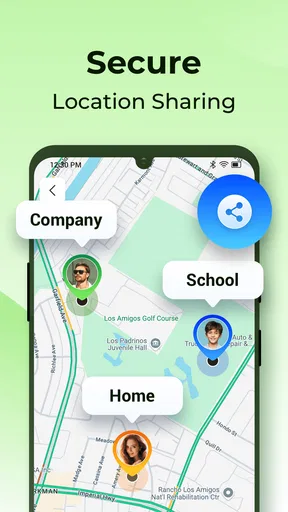
One of the coolest features is the real-time location sharing. You can see where your friends or family members are on a map, and they can see you too. It’s perfect for meeting up in crowded places or just making sure everyone’s safe. The app also lets you create groups, so you can share your location with multiple people at once. This is super handy for events or trips where you need to keep everyone in the loop.
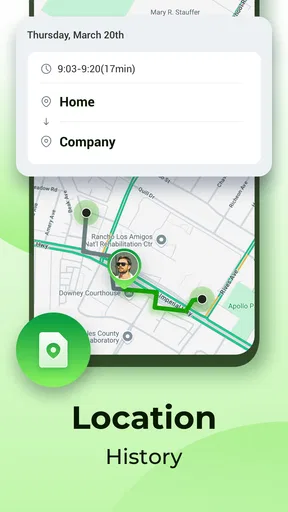
Another feature that I found really useful is the location history. It logs where you’ve been, which can be great if you’re trying to remember that amazing little café you stumbled upon last week. Plus, this feature is excellent for tracking your travel routes or making sure your kids made it to school safely.
Making shared locations useful day to day
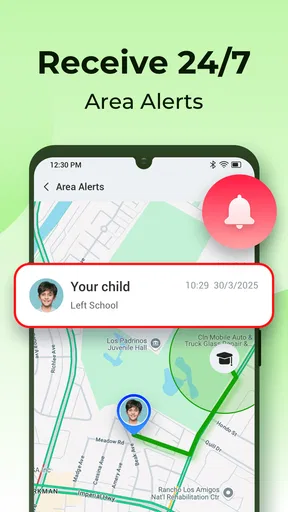
A small planning habit can make these features more useful and less intrusive: decide on the group and purpose before turning sharing on. For a school journey, a parent might use an alert for a familiar arrival point rather than repeatedly checking a map. For a trip with friends, a temporary group can help everyone meet at a station without having each person send directions. I’d avoid making a large, permanent group for every contact; keeping the audience relevant makes location sharing easier to understand and less likely to become background noise.
Location history can also be more useful as a memory aid than as something to inspect constantly. If I wanted to recall a café or retrace a day out, I’d check the record for that specific reason, then leave it alone. That keeps the feature focused on a practical question instead of turning the app into a running log I feel obliged to monitor. Anyone using location records around family routines should also talk openly with the people being tracked, especially older children who may reasonably want to know when and why sharing is on.
Easy Navigation and More
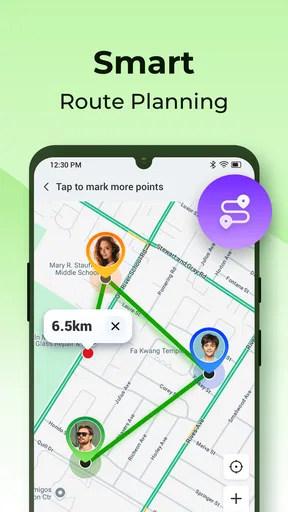
Navigation is smooth as butter. The app integrates with map services, allowing you to get directions to the locations shared by your friends. I found this especially helpful when I was trying to find a friend’s new apartment. No more back-and-forth texting trying to describe landmarks!
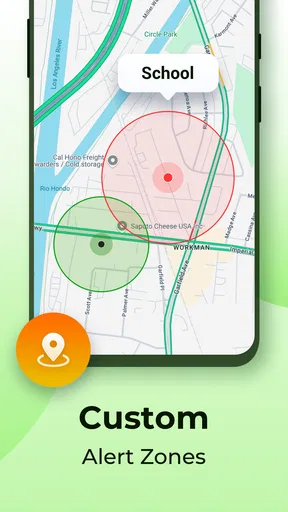
One more thing that’s quite handy is the customizable alerts. You can set up notifications to let you know when someone leaves or arrives at a certain place. It’s a great feature for parents or if you’re coordinating a group outing.
When alerts help—and when they become noise
Alerts are most valuable when they replace a specific check-in, not when they generate a notification for every movement. I’d start with one or two places that matter to the plan, such as the agreed meeting point or a regular destination, and see whether those alerts actually reduce uncertainty. If several people create overlapping zones, the resulting updates can distract from the simple question the group was trying to answer. A restrained setup is easier to maintain than a map full of zones nobody remembers setting.
For a one-off outing, it is worth considering whether sharing a location for the whole event is necessary. A short period of coordination around arrival may be enough; once everyone is together, the group can switch sharing off. That habit is a useful privacy boundary as well as a way to keep the app from becoming another source of constant notifications. The feature is convenient, but it does not replace direct communication when plans change or someone needs help.
What I Think Could Be Better
While I generally loved using Location Mate - Share & Track, there were a couple of areas that I think could use a bit of polish. Sometimes the app took a little longer to update locations in real-time, which could be a bit frustrating if you’re in a hurry. Also, while the app provides excellent functionality for free, some features are locked behind a premium version. It’s not a dealbreaker, but it’s something to consider if you’re looking to get the most out of it without spending extra cash.
The optional in-app purchases run from $2.99 to $12.99 per item, so I would first establish whether the free features cover the routine you actually need. A paid option is easier to judge after you have tried the basic workflow, rather than buying on the assumption that every extra will improve daily use. If you mainly want occasional meet-up coordination, a built-in map app or a quick message may already be enough. If your household repeatedly needs shared locations and arrival alerts, the dedicated setup may earn its place more readily.
How it fits beside familiar alternatives
Compared with using a standard navigation app, Location Mate is aimed at the people-sharing side of the task: coordinating who is where, then using a shared place to meet. A conventional map is usually the better choice when I only need directions for myself or want to search for a destination. A messaging app can be simpler for a single, one-time location pin, while this app makes more sense when a group needs an ongoing shared view or custom alert zones. The trade-off is that a dedicated tracker asks everyone to adopt another app and think about sharing settings.
That distinction matters for less tech-confident relatives too. Before relying on it for a time-sensitive plan, I’d make sure each person can find the relevant group and understands how to pause sharing. A location tool is only reassuring when everyone knows what it is showing and is comfortable with the arrangement. If the group cannot agree on those basics, a meeting point and a phone call may be more dependable than expecting tracking to solve the coordination problem.
Month-to-month value and maintenance
After the novelty wears off, the question is whether the app removes enough small hassles to justify keeping it installed. It has a stronger case for households with recurring routines, friends who meet in changing places, or people who regularly organize group outings. Someone who rarely needs to share a location may find that a standard map and occasional message handle the same need with less upkeep. I would judge its lasting value by whether it prevents repeated coordination—not by how often I open the map out of curiosity.
Maintenance here is mostly about keeping the sharing arrangement sensible. Review who is in each group when plans or relationships change, turn sharing off when a temporary need has passed, and revisit alert zones if they stop being relevant. Those steps are small, but they prevent an app meant to simplify coordination from becoming an outdated source of access or needless notifications. The best routine is one people understand without having to remember a complicated set of exceptions.
Who should choose it, and who can skip it
I’d recommend trying Location Mate if your family or regular group already has a clear reason to coordinate locations and is comfortable agreeing on boundaries. It can be especially handy for meeting in busy areas, organizing a shared trip, or checking a routine arrival without sending repeated messages. I’d skip it if you only need directions for solo travel, dislike location sharing in general, or expect an app to provide perfect, instant updates in every situation. A slower location refresh can matter when timing is critical, so I would keep a direct call or message as a backup.
It is also worth asking the group whether they will actually use a dedicated tool. If only one person installs it, the shared workflow loses much of its point. For a casual meetup, dropping a pin in a familiar maps app may be quicker; for a group that needs repeated coordination, the extra structure can be worthwhile. That is the practical dividing line I’d use before making it part of a household routine.
Wrapping It Up
Overall, Location Mate - Share & Track is a fantastic app for anyone who loves being connected and organized. Whether you’re planning a road trip or just want to keep an eye on your loved ones’ whereabouts, it’s a reliable choice. The real-time tracking, location history, and intuitive interface make it a solid contender in the world of location-sharing apps.
If you haven’t tried it yet, give it a shot! You can find it on the Google Play Store and the Apple App Store. Happy tracking!
My longer-term verdict is a little more conditional: I’d keep it if shared locations and alerts solve a recurring problem for the people around me, and I’d remove it if they do not. The app’s clearest strength is putting group coordination, location history, and custom zones together in one place. Its lasting weakness is the care that location sharing requires: people need to agree on the arrangement, and occasional update delays make it unwise to treat the map as a guaranteed live account of someone’s movements.
Used with a clear purpose and sensible boundaries, it can earn a steady spot on a phone rather than remaining a novelty. Used without a routine, it risks becoming another app to maintain and another stream of information to ignore. I’d start with one real use case, keep the sharing circle small, and decide after a few weeks whether it has genuinely made plans easier. That is the fairest test of whether Location Mate belongs in your everyday toolkit.
Verdict
Strengths of Location Mate - Share & Track
- Accurate real-time location sharing.
- Battery-efficient tracking technology.
- Simple user interface design.
- Supports group location sharing.
- Customizable privacy settings.
Limitations of Location Mate - Share & Track
- Limited offline functionality.
- Requires constant internet access.
- Subscription model for premium features.
- Occasional location update delays.
- Lacks integration with some maps.
Similar Picks in This Category
View All
Uber - Request a ride
Uber Technologies, Inc.4.7


inDrive. Rides with fair fares
® SUOL INNOVATIONS LTD4.8

Yandex Go: Taxi Food Delivery
Mikromobilnost LLC Belgrade4.8

Bolt: Request a Ride
Bolt Technology4.8

Rapido: Bike-Taxi, Auto & Cabs
Rapido Bike Taxi4.8
Frequently Asked Questions
What is Location Mate - Share & Track?
Location Mate - Share & Track is an app designed to help users share their real-time location with friends and family. It also provides tracking features to ensure safety and coordinate meet-ups more efficiently. The app is available for both Android and iOS, offering seamless location sharing with privacy controls.
How does Location Mate ensure my privacy?
Location Mate takes privacy seriously by allowing users to control who can see their location and for how long. You can set permissions for individual contacts and choose to share your location for a limited time. Additionally, the app uses encryption to protect your data from unauthorized access.
Are there any subscription fees or in-app purchases?
Location Mate offers a free version with basic features. However, for advanced functionalities like location history and custom alerts, there is a premium subscription available. The subscription is optional, and users can choose to enjoy the basic features without any cost.
Can I use Location Mate without an internet connection?
While Location Mate requires an internet connection to share real-time location data, some offline features like saved locations and maps are accessible without connectivity. However, for accurate location tracking and sharing, an active internet connection is recommended.
Is Location Mate compatible with both Android and iOS devices?
Yes, Location Mate is designed to be compatible with both Android and iOS devices. The app is available for download from the Google Play Store and the Apple App Store. It ensures cross-platform functionality, so you can share your location with users on different platforms seamlessly.
